
Flows
Automate your wire transfers using our API.
To use the wiring service, you must first complete our licensed partner’s customer onboarding process. In addition, when wiring funds out of your Bitso account, you also need to register your bank account. You can transfer USD funds via wire only after completing the onboarding and registration steps.
The onboarding and bank account registration processes create additional account entities that the service requires to complete transactions through wire transfer. Distinguish each and ensure the use of the correct account when completing transactions:
- Withdrawals: In your withdrawal request, provide the account ID of the internal account the system creates when you register your bank account.
- Deposits: Your sender wires the funds to our licensed partner’s business bank account. Request this account’s data via a deposit intent call.
Figure 1 depicts the accounts involved in wire transfers.
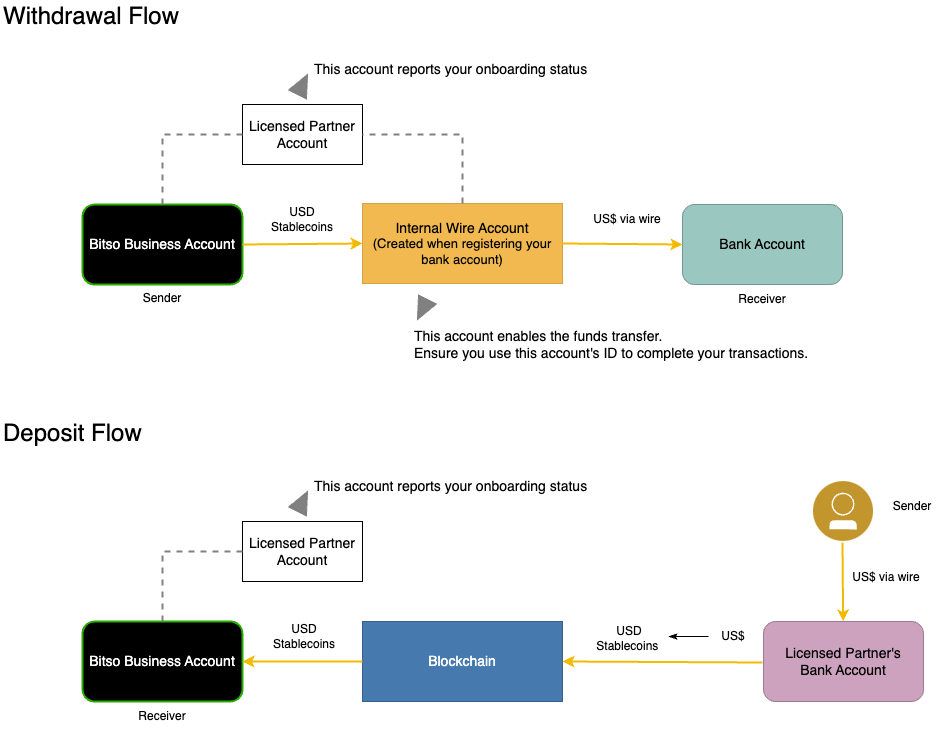
Figure 1. Accounts Used in USD Wire Transfers
Wire Withdrawal Flow
To send USD from your Bitso account to a US-based bank account via domestic wire transfer, you use the general-purpose endpoint of Bitso’s Withdrawal Service: /v3/withdrawals/, configuring its parameters for USD and the corresponding wire method.
In Bitso, any withdrawal is associated with a taxonomy that identifies a currency, a method, and an integration with a payment gateway. Through the /v3/withdrawal_methods/{currency} endpoint, Bitso guides you in configuring these taxonomy parameters.
The USD wire withdrawal flow comprises the following steps:
- Complete the Customer Onboarding process: Accept the Terms of Service of our licensed partner, POST
/v3/payments/usd/bridge/onboarding, and approve the KYC compliance assessment. - Register your US-based receiving bank account, POST
/v3/payments/usd/bridge/onboarding. This process creates an internal wire account and links it to your Bitso and bank accounts. Withdrawals go through this internal account. - Configure the transaction’s taxonomy parameters, GET
/v3/withdrawal_methods/usd. - Make the withdrawal call, POST
/v3/withdrawals/. - Track your withdrawal, GET
/v3/withdrawals/{wid}.
Wire Deposit Flow
To receive USD in your Bitso account from a US-based bank account via domestic wire transfer, you first need to generate the deposit instructions that enable your sender to complete the funds transfer.
As soon as your sender wires the fiat funds to our licensed partner’s bank account —with the correct amount and required deposit message— Bitso and its partner take care of the rest and send the USD stablecoins to the destination address associated with your Bitso account.
The USD wire deposit flow comprises the following steps:
- Complete the Customer Onboarding process: Accept the Terms of Service of our licensed partner, POST
/v3/payments/usd/bridge/onboarding, and approve the KYC compliance assessment. - Generate the deposit instructions, POST
/v3/payments/usd/bridge/deposit-intents. - Have your sender complete the wire transfer to the indicated recipient bank account.
Avoid Delayed or Rejected DepositsWhen receiving USD funds via wire, consider that the following is of utmost importance:
- Your sender's wire must include the wire message provided in the response of the deposit intent call.
- The amount wired must be the same as that specified in your deposit intent call.
Otherwise, your transaction might suffer delays or rejection because the service will find mismatched information, which prevents crediting the funds and completing the transfer.
Updated 8 months ago
What’s Next
Look into the following articles to learn about the details of these steps: