
Pay-Ins
The Pix Payments API uses QR codes to simplify and expedite pay-ins. A QR code, or quick response code, is a type of barcode used in the digital transaction space that enables the rapid and seamless exchange of information.
Pix can work with two main categories of QR codes: static and dynamic. The API supports dynamic QR codes, which are best suited for one-time payments.
As the name implies, a dynamic QR code ciphers variable information that can be modified in each transaction. This ability proves particularly advantageous in scenarios involving transactions of varying amounts or the necessity to incorporate specific details in every payment. For instance, in online shopping, the dynamic QR code can encompass details such as the payment amount and other pertinent information tailored for that specific transaction. Subsequently, every scan of the dynamic QR code can reveal distinct values and unique transaction details.
The API includes the following set of RESTful endpoints for receiving payments:
- Generate a dynamic QR code: Within your website, consumers can request a QR-based payment and receive a dynamic QR code that guarantees a contactless, instant, and successful payment. The code contains all the necessary details of the transaction, such as the payer's data, transaction amount, and a unique identifier.
- Create a static QR code: Your consumers can also complete payments via a static code.
- Retrieve a QR-code pay-in: Retrieve comprehensive information about transactions made via a dynamic QR code.
- Retrieve a dynamic QR code: Get a previously issued code.
Note: This endpoint is a future development and is not currently available. - List your pay-ins: Retrieve detailed information about direct deposits and inbound reversals made into your account.
- Receive webhook notifications: Set up a callback URL where the webhook delivers automatic updates on your account's pay-in events.
Benefits
QR codes enable consumers to initiate payment by simply scanning the code with their cell phone's banking or digital wallet application without manually entering payment details. They need only to confirm the transaction. This not only simplifies the payment process —reducing the time and effort required to complete a transaction for providers and consumers— but also enhances security by minimizing data entry errors.
Enabling the Pix platform ensures Brazilian consumers have access to the most widely accepted method, guaranteeing seamless, instant payments around the clock on any day of the year.
On the other hand, the API strengthens your client application in diverse ways. Its validation platform ensures that the payer clears the screening process before accepting any payment and that the transaction occurs within the limits. These two validations may be optional depending on the type of business you intend to offer to your Brazilian customers and the entity under which you operate.
The platform also protects you from money laundering by ensuring that only your consumers can complete payments: Pay-ins on behalf of a third party are not allowed. The taxpayer ID who requests the code is the only one who can complete the payment. This third-party payer verification always occurs and cannot be turned off. In addition, the API generates unique QR codes that guarantee the acceptance of only one payment per code, streamlining your reconciliation process.
Use Case
QR codes facilitate many different fast payment use cases. Merchants and PSPs (Bitso partners) can present QR codes on their websites, mobile devices, checkout pages, paid subscriptions pages, digital wallets, and many more, providing additional secure payment methods to consumers.
The process depicted in Figure 1 exemplifies how a QR-code-based consumer payment can be accomplished using the Pix Payments API:
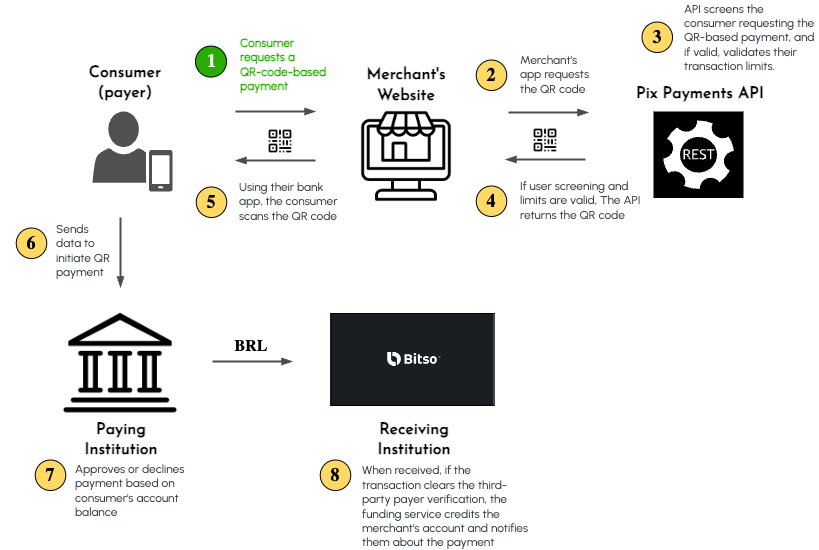
Figure 1. QR-Code-Based Payment
The flow is as follows:
- A Brazilian consumer (payer) needs to pay a service provider (merchant), so they request a QR-code-based payment on the merchant's website. Likely, the consumer previously logged into their account. The consumer indicates that they want to pay using Pix and specifies the amount to be paid.
- The merchant's application requests the QR code to the Pix Payments API, sending the consumer's CPF, full legal name, and amount to pay,
POST /v3/funding_details/pix/dynamic-qr-code. - If the Bitso partner enables the screening and limit validation feature, the Pix Payments API screens the consumer using the taxpayer ID provided. If the consumer receives a thumbs up, then the API verifies their transaction limits. The API generates a QR code if the requested payment lies within the limits.
- The API returns the QR code to the consumer on the merchant's website.
- Using their bank application, the consumer scans the QR code on the Pix area of their application. The application parses and verifies the code and shows the amount to the consumer for confirmation.
- When the consumer confirms the payment, their bank application sends a payment transaction request to the Brazilian bank that handles the consumer's account (Paying Institution) for approval.
- The Paying Institution approves or declines the payment.
- When Bitso receives the payment, the service performs the third-party payer verification: The taxpayer ID registered in the QR-code request must coincide with the ID registered in the transaction. If false, the service rejects the payment. Otherwise, Bitso's funding service credits the BRL funds to the merchant's account (payee) and notifies a callback URL of the payment.
Updated 3 months ago